Posts

AWS: On Demand Capacity Reservation (ODCR) and preventing Insufficient Capacity Error (ICE)

 What is ODCR, and why does it matter? On-Demand Capacity Reservation is one of the ways how we can reserve capacity on AWS. This feature helped to reserved capacity especially the large EC2 instance or special instances like (P series) that is very little in the Availability Zones (AZ). The service will not charge you if you have an EC2 running 24 by 7. It will ensure when you need to start/stop your EC2, the same instance family/types for that particular AZ are reserved for you. It is not commitment-based, like a Reserved Instance or Saving Plan, where you need a minimum of 1 year. ODCR is only activated once you enable it in the AWS Console. You can cancel it anytime if you do not needed. What is an Insufficient Capacity Error (ICE)? ICE is an exception where there are not enough EC2 instance families available in a particular Region or AZ. This is not common in AWS, but it has happened before, especially for large EC2 like 32x or special EC2 like P series.  How does ODCR h...

Redhat Repo on AWS

Image
I encountered a lot of questions, mainly about the RED HAT REPO. The Cloud Engineer asked if AMAZON has a RedHat Repo and if they can patch their EC2 without going through the Internet. The simple answer is NO. RED HAT hosts its RHUI (Red Hat Update Infrastructure) in AWS, but you can only access its Repository via the Internet (through Internet Gateway—IGW). You can refer to: https://aws.amazon.com/partners/redhat/faqs/ How can a private EC2 be updated? Depends on your company policy. Over here, I have 2 options: Option1, access through IGW via NAT Gateway You can leverage NAT Gateway to access the Internet. Red Hat maintains its Repository in each AWS region. You can update your RED HAT EC2 to point to the following URL(https://access.redhat.com/articles/4720861) Depending on your region, need to update the URL of the Red Hat report URL so your traffic can flow to it. rhui3.<<Region>>.aws.ce.redhat.com Option 2:  Create a local Red Hat Repository, and all your EC...

AWS Developer Experience

 In AWS, builder are empowered to build secure, faster and better code through the tools available to them by AWS. We shall break down those tools in this blog. 1. Amazon Q Developer (formerly known as Code Whisperer) This is AI to help builder to generate sample code that was trained by AWS. you can use your favourate programming languages like python, java, typescript/javascript and c#.  This can integrate with popular IDE like visual code, visual studio, pycharm and intelliJ.  2. Amazon Q (primarily consists of Amazon Q Business App and Amazon Q Developer) It is Generative AI asisstance can help answer your questions just like ChatGPT. If a company have common tools or API, you can also trained Amazon Q to understand how the api been use so the developer in the company can use Amazon Q to guide them how to use those tools or API. Amazon Q wont use the data to train it model. Data within the company stay in the company. Developer can integrate Amazon Q into Visual Code ...

AWS Local Zones - Understand the Subnets

Image
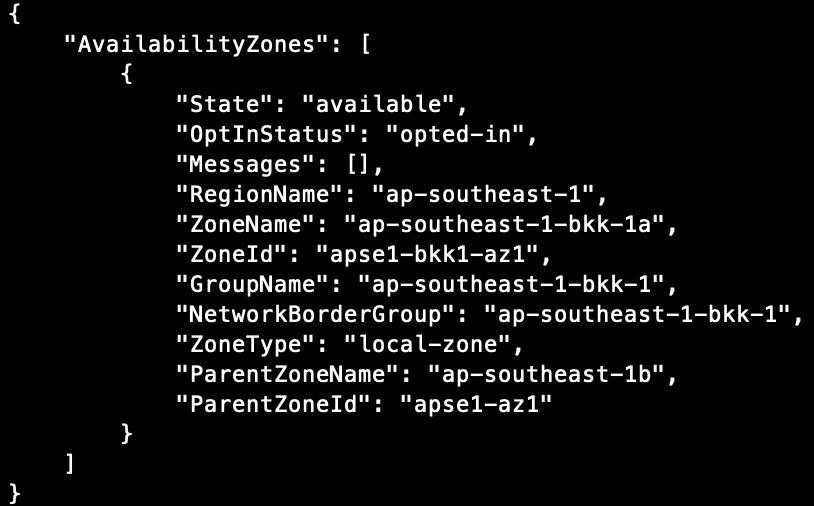
Local Zones have some attributes that we need to take notes expecially when we need to create EIP or RDS. Below some explainations: Command:    aws ec2   describe-availability-zones --filters "Name=zone-type,Values=local-zone" --region ap-southeast-1 Above is using Bangkok Local Zone ZoneName : This property can be use when we want to create subnet in Local Zone GroupName : I t is use to group all the local zones available in that place\area.  Note: The picture above i am using us-west-2-lax (LA) because Bangkok only have 1 Local Zone. NetworkBorderGroup: When we use local zone, AWS will create 2 networkBorder Group (Region and Local Zone). It use by EIP / IPv6(now only available in LA at the point of writing this blog). If EIP is for Local Zone, select the NetworkBorderGroup for it.  There is it.

AWS Local Zones - Unable to launch EC2

Image
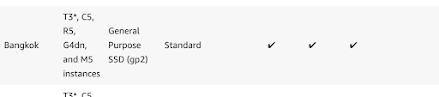
 Background: when tries to launch ec2, based on documentation(https://aws.amazon.com/about-aws/global-infrastructure/localzones/features/), you can select the availble EC2 instance type and also the EBS type as recomended by the documentation: Once you have selected those instance type as recomended by AWS documentation, you may encounter the below error (Please note the error messages): Resolution: 1. Instead of choosing the instance type and select directly, you need to click on "Compare instance type" link instead: 2. Show the "Availabiliy Zones" column by selecting the "gear" icon first: 3.  In the Searchbox, select "availability zones: <<Local Zone Name>> to find out which instances are available for us to use in the Local Zones (if you see the below pictures, we only have 4 types):  4. Once done, launch your instances with other configuration just like how you launch your normal ec2 and ensure to select the EBS types that is supporte...

AWS - Local Zones

Image
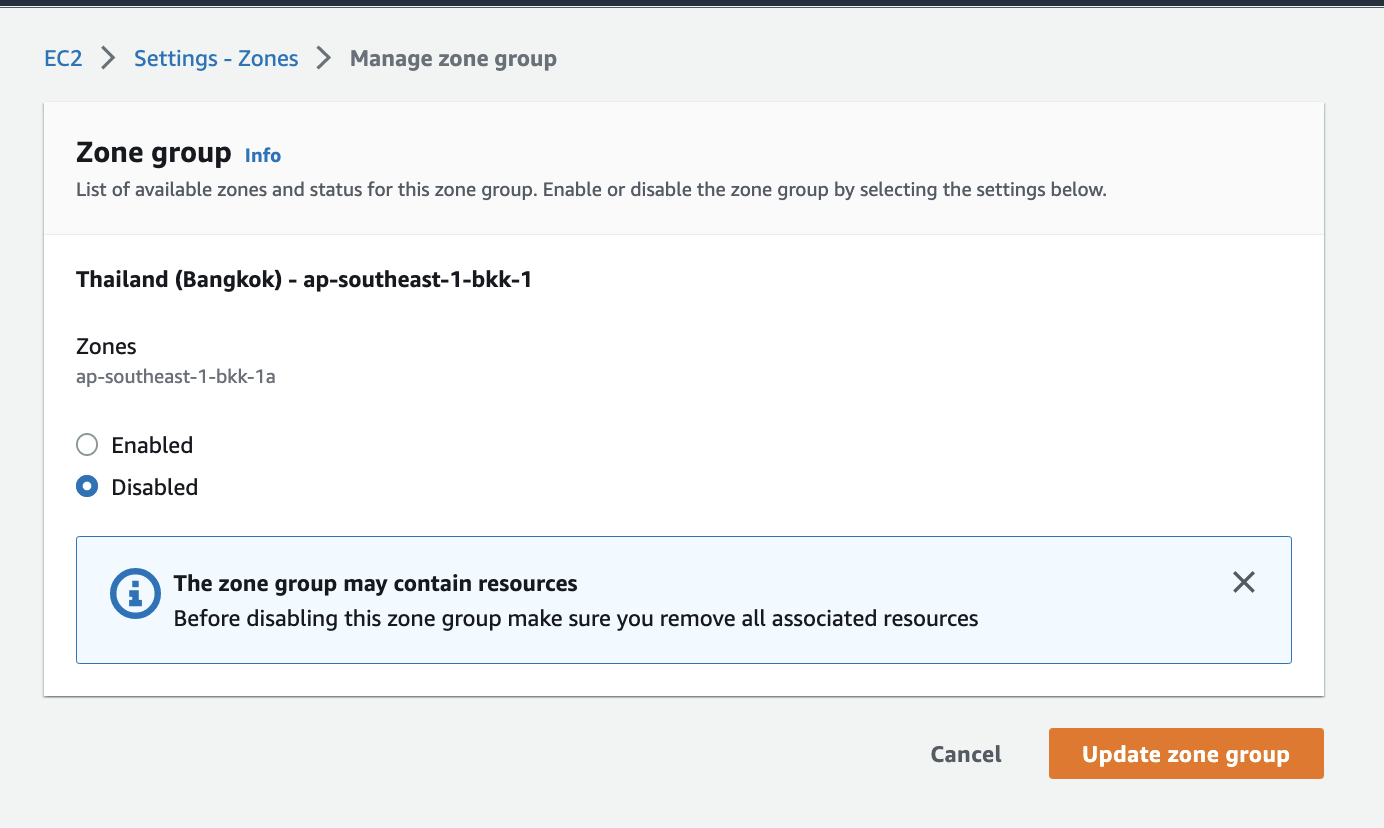
What is Local Zones? a. It is an extention of availability zone to those country where AWS do not have region in. b. Design to get closer to customer hance, enhancing latency or/and data residency due to compliances. Setup: 1. Enable Local zones, first select the region you want to connect your local zone. In this example, my region is Singapore (ap-southeast-1) and therefore enable local zone in Thailand: a. https://ap-southeast-1.console.aws.amazon.com/ec2/home?region=ap-southeast-1#Settings:tab=zones b.  c. Create VPC in ap-southeast-1 d. create Subnet in Local Zones That it for quick start in AWS Local Zones.

Terraform with Docker for Macbook M1 (ARM)

My intention is to blog how I build Terraform in a Docker image, compile it and run as "alias". Official docker image for Terraform do not provide ARM64 architecture at the point of writing this article. In addition to that, I wanted to play with Google Distroless image. Step:1 Create a docker file with multiple build stage: DockerFile Step:2  Build the docker image, for my case, I intend to save the image in DockerHub hence I am running the following command: "docker build -t wongchuinhun/terraform" and upload into my docker hub wongchuinhun/terraform Step: 3 I want to create an alias in my Macbook instead of typing the full docker command, hence I added the following in my zshrc file: alias t = "docker run -it --rm wongchuinhun/terraform" Step:4 To use it, I simple go to my terraform working folder and type the following code in my Terminal: t init 

File Structure (Part 1)

Image
There are few ways for people who arrange their folder structures and which i do not wish to invent it. My approach is to arranging my folder structures based on Features not by types What is Type? Angular have alot of types. for example, we have Controller, Services, Directives which are the commonly used. We do not wish to arrange our file structure like this: This file approach is suitable only for SMALL application, for enterprise application, we have tons of Modules and alot of programmers are working on different modules. So before we jump to multiple modules, we should first arrange our file structures by modules. Let say build an intranet application which consists with Employees modules, eTimelog modules and eLeave modules. I would like also to create main folder to stores all my framework (layout, sidebar, navigationbar, footer-bar etc on my site. here is my simple file structure: - common: putting all my modal, services\repositories\utilities class to be...

Office 365 for Developer: Baby Journey (1)

Image
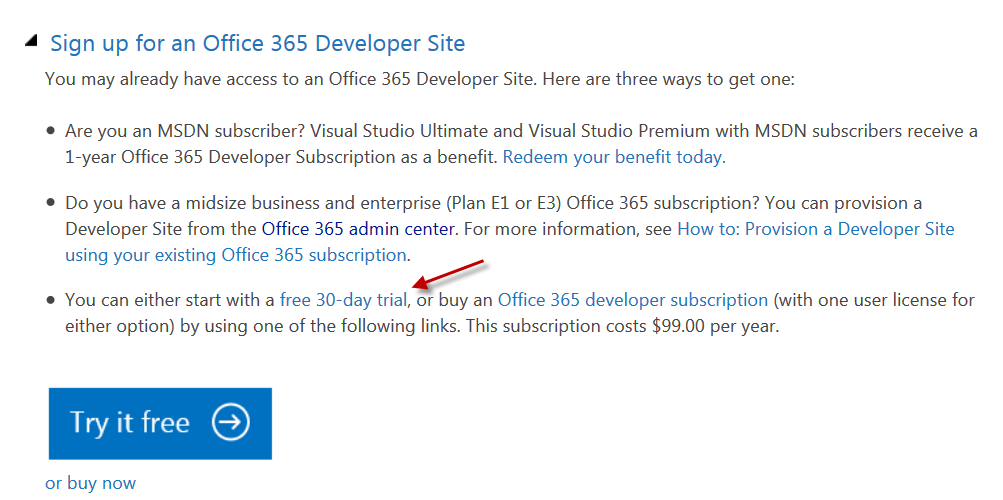
Introduction to SharePoint Cloud (Office 365) Introduction This articles for developer who want to start programming SharePoint 2013 Cloud and don't know where to starts. As a developer myself, I too have issue as i have 0 knowledge on where to start. Here are the benefits to the young and wild developers out there. Sign-up for Office 365 Developer Site 1. 30 days trial 2. charge by per user\month after 30 days. Copy from (http://msdn.microsoft.com/en-us/library/office/fp179924.aspx) Once register, you can login into your O365 Admin page,configure all the settings your want and setup all the basic setting and grant yourself to enable SharePoint Online for Developer. Set yourself to enable SharePoin Online Developer: Verify if you can access to SharePoint Online 3. Start a new Visual Studio.NET project and create a sample Test App. a. Select New Project, select Office/SharePoint templates and click on App for SharePoint 2013 b. Key In the follow...

SharePoint 2013 - ListFieldIterator Save issue

Image
Background Stories: I need to customize List Item New Form to arrange my fields. I also need to auto generate the fields if user create their own field in the List. I decided to create my own List Definition and create my own NewForm.aspx associate to the List Definition. In my NewForm.aspx, my requirement is to hard-code those fields predefined in the List Definition and combine new fields created into the List. Thus, I decided to use ListFieldIterator control to generate those new fields that not in my NewForm. ListFieldIterator is very intellegent because it will not auto generate the fields if you have created elsewhere(must be before the ListFieldIterator control) in the aspx page. Below is the result that I want. See my xml: Problem When click on [Save] button, the "Title" field is NOT save into my list. I notice that when I look at Fiddle, it called the Client.svc and it will not post back to my current aspx page.  Title field is Empty. ...

SharePoint 2013 for Developer: Baby Journey (2)

Image
Setting Up SharePoint Farm for SharePoint 2013 Development 1. Setting up Site Collection Host Name Web Application to host all the site collection hosted name a. Create Site Collection Hosted Name Web Application b. Create Site Collection with Developer template Setting up Site Collection Host Name a. The Site Collection Hosted Name Web Application is really an empty web application which tied to your server url (e.g http://servername ). We are using this web application to host all our site collection. For example( http://intranet.company.com or http://developer.company.com ). b. No site collection in it need to be created after creating the Site Collection Hosted Name Web Application at Central Admin. Note: Site Collection hosted name have in SharePoint 2010 also. How a. Go to Central Admin to create a Web Application b. Click New c. Key in Name: SharePoint – Host Port: 80 d. Use the Application Pool or create your own Applica...